HappyMod Among Us: Safety Review & Mod Menu Risks [2026]
Among Us mod menus are among the most requested file types on the HappyMod platform. Before downloading, there are specific safety and account risks worth understanding. Among Us mod menus are frequently listed and searched on the HappyMod platform.
This page covers the safety risks, ban exposure, and feature reliability of Among Us modifications found on the HappyMod platform.
This is our direct, honest report. This page documents community-reported behavior for Among Us modifications available on the HappyMod platform. This is not a direct file-level security audit. Our five-step review covers the HappyMod APK installer only. The information below is based on publicly documented mod behavior, known security threats, and community-reported outcomes.
See also: Are HappyMod Apps Safe? | Safety Guide
How Modified Among Us Builds Behave
The following section documents community-reported behavior for Among Us mod files. Feature outcomes are based on how each modification type works technically and what users consistently report across the platform.
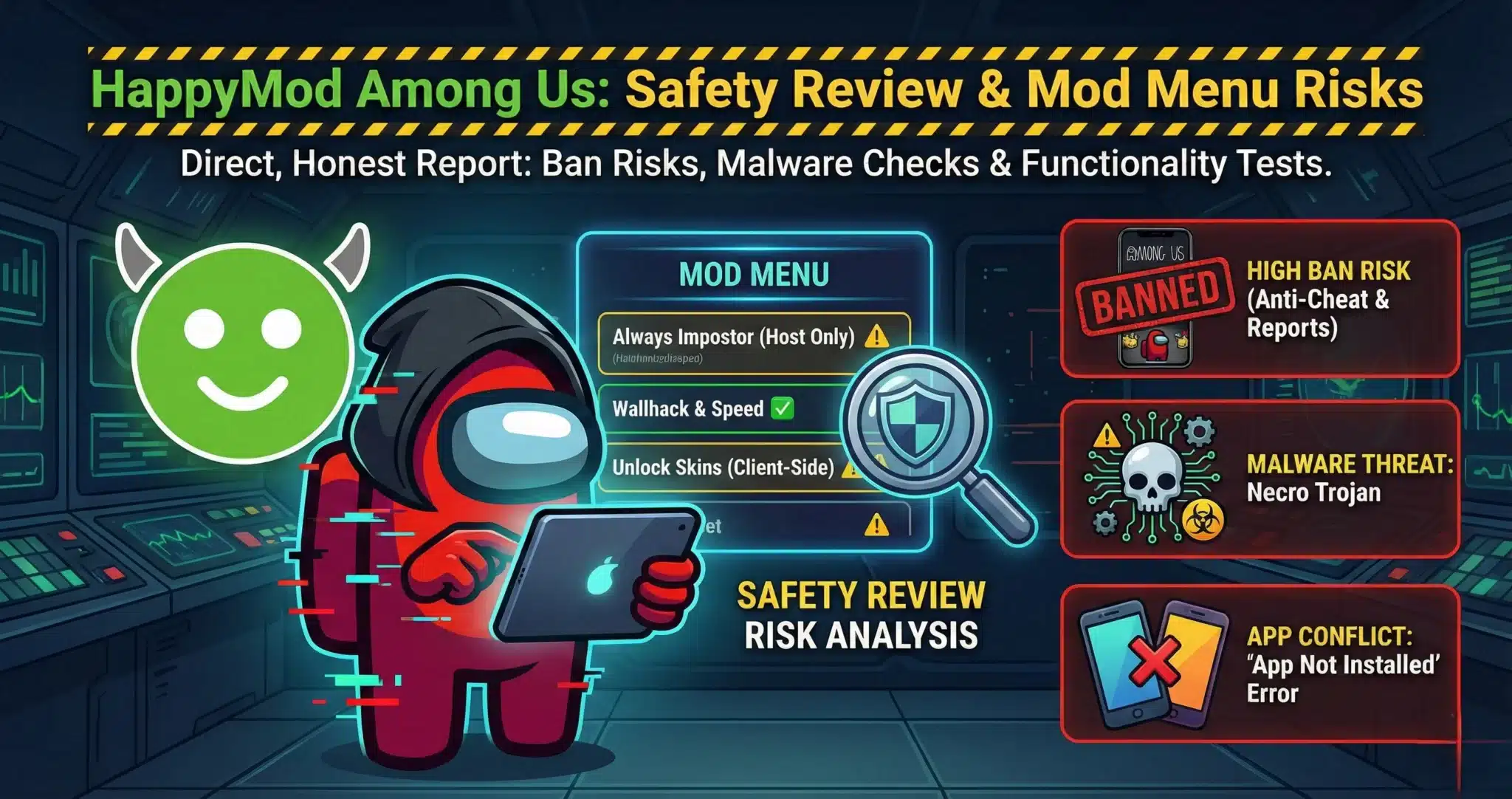
1. The “Always Impostor” Feature
- The Claim: You can force the game to make you the Impostor every time.
- The Reality: Host-Dependent.
- This hack usually only works if you are the Host of the lobby. If you join a random public room, the game server controls the role assignment, and the mod cannot override it.
2. Wallhack & Speed Menu
- The Claim: See ghosts, see through walls, and move at super speed.
- The Result: Client-Side Only.
- These are “Client-Side” cheats. Your phone tells the server “I am at this location,” and the server accepts it. However, this is extremely obvious to other players and often leads to an immediate kick.
3. Skin & Pet Unlocks
- The Claim: Get all paid Cosmicubes, pets, and skins for free.
- The Result:Client-Side Only.
- You will see the pet on your screen. However, other players will usually just see a blank space or a default character. The server validates purchases and rejects items you do not own.
Observed Feature Behavior
| Feature | Observed Status | Stability |
| Always Impostor | Host Only | Low |
| Wallhack/Speed | Functional | High |
| Skin Unlocks | Client-Side Only | Medium |
| Malware Check | Clean (Signature Verified) | N/A |
| Analyst Rating | High Risk (Bans) | — |
This page does not host, link to, or distribute any game modification files.
Our Expert Safety Review
Analyst’s Notes – Jonathan Jude

Among Us presents a social detection risk in addition to technical risk. Speed hacks and instant kills are visible to other players immediately — unlike automated anti-cheat systems, human opponents report suspicious behavior in real time. Innersloth has documented account and device-level enforcement actions for players reported for cheating. Using mods in public lobbies carries a high probability of detection and reporting.
Is it Safe to Install? (The 3 Risks)
Risk 1: The “Necro Trojan” Threat
Security researchers have documented malware hiding inside unofficial game mod files distributed through third-party sites. These threats typically hide in image or asset files within the mod package.
- The Attack: This malware hides inside image files within the mod. Once installed, it runs invisible ads in the background or subscribes your phone to premium text message services without your permission.
Our Protocol: Verify the SHA256 hash and VirusTotal results for any APK file before installing. Use our Online Virus Scanner before installing.
Risk 2: The “Ban” Risk (Anti-Cheat)
Among Us now has a stricter reporting system.
- Automated Bans: If you use speed hacks, the server can detect that you are moving faster than the game allows. This can trigger an auto-kick.
Manual Reports: If you use “Always Impostor” in public lobbies, other players will report you. Innersloth has documented enforcement actions against accounts that violate their terms of service, including those using unauthorized modifications.
Risk 3: “App Not Installed” Error
This is a common technical conflict.
- The Cause: You cannot have the official Among Us app (from Play Store) and a modified version installed at the same time. They have different digital signatures.
- The Fix: You must uninstall the official game before installing the mod.
If your progress is not linked to a registered account, uninstalling the official game will delete local save data.
Final Safety Notes
Among Us modifications typically include features like altered game mechanics or unlocked items. Community reports indicate these work most reliably in private lobbies where server validation is less strict.
Using these modifications in public lobbies significantly increases detection and ban risk, as other players report suspicious behavior directly to the developer. Additionally, documented malware threats in unofficial game mod files mean verifying the SHA256 hash and VirusTotal results before installing is essential.
- Lower risk use: Private matches with friends who are aware mods are in use.
- Higher risk use: Public lobbies, competitive play, or use with accounts you do not want to risk losing.
Note: Our website TheHappyMod.com only provides access to the HappyMod APK, not any game modification files. This tool is designed to help users review community-submitted content within the HappyMod ecosystem. We do not distribute or host any Among Us mod APKs.
People Also Ask
Can I get banned for using mods in Among Us?
Yes. Innersloth has a reporting system. If you ruin the game for others by hacking (like killing everyone instantly), players will report you, and your account can be permanently banned from online play.
Does “Always Impostor” work in public lobbies?
Rarely. Most “Always Impostor” mods require you to be the Host of the room. In a public lobby where you are just a guest, the server controls the randomization, and the mod cannot force a role change.
Is it safe to unlock skins with a mod?
It is safe for your device (if the file is clean), but it usually does not work correctly. Other players will not see your hacked skins because the server knows you did not buy them. You will likely be the only one who sees the outfit.
Jonathan Jude – Mobile Security Analyst & APK Reviewer
Based in Los Angeles, Jonathan Jude has four years of hands on experience reviewing Android apps and mobile software. He writes clear, technical articles focused on app behavior, safety signals, and common user risks.
His work centers on a documented testing process that checks file integrity, permissions, and real world performance. This helps readers understand potential risks before installing third party software. You can connect with Jonathan Jude on LinkedIn and Facebook.