
Mod-APK Platform
HappyMod APK Download – Latest (v3.4.1) for Android 2026
HappyMod is a third-party Android app store for modified games and apps — a Google Play alternative where community-uploaded builds carry unlocked premium features, removed ads, or extra in-game resources. The store installs as a standard APK; the mods inside it download as separate files.
Before installing anything, run the file through the Virus Scanner — a real multi-engine detection count you can read in under 30 seconds, not a badge.

KEY FACTS
Versionv3.4.1
File size20 MB
PlatformAndroid 5.0 and above
LicenseFree
DeveloperAIO Team
Scan status0/65+ detections
What Is HappyMod?
200,000+
modified apps & games, each with a working-percentage and real user reports
HappyMod is an Android marketplace holding over 200,000 modified apps and games, each listing showing the exact modification, the target Android version, the file size, and a community rating before you download. A mod here is a rebuilt version of an existing app — a game with unlimited coins, an app with its premium tier unlocked — uploaded by a community member rather than the original developer.
Using it is a two-step process, and confusing the two steps is behind a lot of first-time trouble: first you install the HappyMod store app itself — the 20 MB APK in the table above — then you use that app to find and download the individual mods, each of which is its own separate file. The store is a delivery tool, not a bundle; installing it doesn’t install any mods, and a title downloaded straight from a web page outside the app can misbehave in ways the same title fetched through the app does not.
It helps to be clear on what the app is not, because the word “mod” gets attached to unrelated tools: HappyMod is a store that distributes other developers’ modified apps — it is not itself one of those mods, and it is not a phone cleaner, booster, VPN, or system-tweaking utility. Anything carrying the HappyMod name that describes itself that way is a different product trading on the name, not this store.
The signal that separates a working mod from a broken one is the working percentage — the share of users who reported the build ran as described, drawn from real install-and-report data rather than a star average. A mod at 90%+ has been confirmed by most people who tried it; one near 40% is flagged unreliable before you spend a download on it. Each listing also shows how many separate versions of that mod exist, because a build that runs on one Android release or device fails on another, and the app keeps the older working version reachable.
That working-percentage system stands in for the review a first-party store runs. A mod reaches a listing in three steps: a community member uploads a modified build, other users install it and report whether it worked, and that reporting sets the working percentage and fills the comment thread.
Screening therefore happens after upload, through that data — not through a developer verifying the file before publishing. The distinction drives the safety question below: community-reported reliability answers “does this mod run,” not “is this file clean,” and treating the first as if it settled the second is the most common mistake a first-time user makes. The two are separate checks, and only a scan performs the second.
Each listing also states its mod parameters — the exact changes from the original build — rather than a vague “modified” label. Reading them before downloading is the single most useful habit; the how-to-use guide covers what to look for. The catalog sorts into two top-level branches, games and apps, each subdivided so a specific title is reachable by browsing as well as by the search bar, with results ordered by most-downloaded or most-recently-updated.
The platform is published by a developer group under the AIO Team name; it collects and hosts community mods rather than authoring them, which is why the same title appears as several competing builds from different uploaders — and why picking the one with the highest working percentage matters. Because the name is short and easy to imitate, apps and download pages using near-identical spellings exist from unrelated developers with no connection to AIO Team; the fake-sites guide covers how to tell the genuine source from a copycat before you download. HappyMod Pro is not a paid tier — no official paid version exists. A “HappyMod Pro” purchase is a rebranded repackaging with no basis in any real release; the Pro-version page covers that pattern in full.
What’s New in Current Version
The version and file-details table above states the current confirmed build — that is the number to check an install against, not a version already sitting on a device. HappyMod has no auto-update: getting a new release means downloading and reinstalling it manually over the existing app, the same way it was installed the first time. Nothing pushes in the background, so a build stays exactly as installed until that manual step happens.
Prior releases list their own real size and changelog for a device that needs an older Android target or a rollback after an update breaks something. Updating safely — reinstalling over the top without losing installed mods or their save progress — has its own step-by-step guide.
Checking back against this table matters most after a specific mod stops working, since a mismatch between the installed HappyMod build and what a newer mod listing expects is a more common cause than a corrupted download.
Is HappyMod Safe? Real Verification, Not Just a Claim
Run the file through the scanner and read a real multi-engine detection count before you install — that is the direct answer for this file, a number to act on rather than an unbacked assurance. A fabricated infection-rate percentage, a named antivirus brand with no link to verify it, an unnamed “background test” — none of that is checkable. A number you can read yourself is.
The risk is Dynamic Code Loading, and it lives in modded APKs specifically
Modified APKs can carry Dynamic Code Loading stubs that fetch dormant remote payloads after installation, allowing unauthorized background code to bypass initial static virus scans.
For the complete technical breakdown of DCL risks, phishing overlays, and permission audits, read our full HappyMod Safety Guide.
A system warning is not a malware finding
Android flags every sideloaded APK as coming from an unrecognized source. That notice fires on a completely clean file too — it reflects only that the install did not come from the Play Store, not that a threat was found. A real detection is different: it names a specific threat class from an antivirus engine, not an unusual origin.
One engine flagging a re-signed game out of sixty five can be a heuristic false positive on the re-signing itself; a dozen engines naming a payload is not. Separating those two is exactly what a multi-engine scan does that a single “safe/unsafe” verdict cannot.
What the scan returns, and what it cannot cover
The scan submits the file to a multi-engine check and returns three things: the number of engines that flagged it, the threat names they assigned, and the signing certificate — evidence read directly rather than a badge printed by someone else. Reading the result takes three questions:
How many engines flagged it, not just whether any did.
One flag on a re-signed game is a heuristic reaction to the repackaging itself; a cluster of flags is a real signal.
Do the flags name a consistent threat family
— a trojan, a known adware SDK, a credential-stealer — or scattered generic “riskware” labels? A named family across several engines is the serious case.
Does the signing certificate match across the versions of a mod that claim the same source?
A certificate that changes between builds of the “same” mod is a repackaging red flag.
A clean file returns a low or zero count with no consistent named payload; a compromised one returns several engines naming the same family.
No platform-wide promise covers all 200,000+ community-uploaded mods — the catalog’s scale makes continuous re-auditing of every file impractical, and stating that plainly is more honest than a blanket “safe.” A scan also reads the file as it exists at download, so it cannot see a remote payload fetched later — which is why the permission-match check below matters alongside the scan, not instead of it.
What is verifiable is the single file in front of you, at the moment of download, plus the permissions it asks for. Both are checks you run yourself, and both beat taking a stranger’s “100% safe” on faith.
Before installing anything, scan the file, match its permissions to what it actually does, and check recent comments — the full step-by-step vetting checklist lives on the HappyMod Safety Guide.
HappyMod Features
The store’s core job is discovery and delivery of modified APKs, built on features that each change a decision you make before installing:
Search and category browsing
across games and apps, sortable by most-downloaded or most-recently-updated. The sort is not cosmetic: most-downloaded surfaces the builds with the most report data behind their working percentage, so a high-download mod’s reliability figure is better-evidenced than a new upload’s.
Version history per mod
— older uploads stay available. This is the fix when a game’s own update breaks the current mod: rolling back to the last build that matched the game version restores it until a newer mod appears, instead of leaving you stuck on a crash.
Working-percentage and comment threads
on every listing — the platform’s real screening layer and the fastest read on whether a specific build currently works. A mod can drop from 90% to 40% overnight when a game update lands, so the number is a live signal, not a permanent grade.
Mod request
— an app not yet listed can be requested, and the request count itself signals demand that pulls uploaders to fill it. A high request count on a missing title is a reasonable sign a working mod will appear soon.
Guest browsing
— browsing and downloading need no account at all; signing up only matters if you want to comment, rate, or request a mod, covered on the how-to-use guide.
In-app download manager
— mods download through the app rather than a browser, which is what lets it place large games’ extra data files correctly (the OBB issue covered in the install section below).
None of these features screens a file for malware — that gap is exactly what the scan step covers. Discovery and reliability are what the platform does well; safety verification is what it leaves to you.
HappyMod vs. Google Play Store
HappyMod trades Google Play’s install-time scanning and pre-listing review for free access to modified and premium-unlocked apps that Play prohibits — a direct swap of safety guardrails for content freedom.
Install-time scan
None — sideloaded
Play Protect, before and after install
Review before listing
Community-reported after upload
Developer-submitted, reviewed before publish
Modified / cracked apps
Core catalog
Prohibited, removed on detection
Cost
Free (ad-supported)
Mixed free/paid, in-app purchases common
Update delivery
Manual re-download per mod
Automatic
Security patches
None — build frozen at upload
Developer fixes pushed to all users
Account requirement
Optional (guest browsing)
Google account required
Neither side of that trade is free. Removing the paywall also removes the review gate the paywall funded — the two are the same mechanism. Reading the rows the way they matter to a download decision:
The install-time scan is the single biggest thing given up — Play Protect checks every app before and after install, a sideloaded APK gets neither. Weighed against the rest of the trade-off below.
The pre-listing review gap is only partly covered. Working percentage and comments tell you whether a build functions; nothing on the platform tells you whether it is clean. Function and safety are different questions, and the community data answers only the first.
The manual per-mod update means a mod never auto-patches. A build that works today can silently fall behind a game’s server version and stop working until you download a newer mod — the “it worked last week” complaint traces here.
None of these makes HappyMod unusable; together they define what you do yourself that Google Play would otherwise have done for you.
Pros and Cons of Using Modified Apps
The honest version of this list puts the real downsides beside the benefits, at the point the download decision is made — not in a footer after you have already installed.
Pros
Free access to paid apps and premium tiers — content behind a Play paywall arrives unlocked, at no cost and with no subscription.
Version history — an older build stays available when a new one breaks on your device, so an update never traps you on a non-working version.
Working-percentage and comments show whether a specific mod currently runs before you spend a download.
No account needed to browse or download — a download-only session exposes no email or profile.
Access to region-locked and delisted apps — a title geo-blocked in your country, or pulled from the Play Store entirely, can still be reached as a mod or an older archived build.
Cons
No install-time scan. Every mod is sideloaded, outside Play Protect — the reason the per-file scan matters on every download.
Dynamic Code Loading risk. Some mods hide behavior that activates after install and after any one-time scan.
No developer support when a mod breaks. A mod has no official developer to file a bug with or claim a refund from — when a build stops working after a game update, the only recourse is rolling back to an older version or waiting for a new upload, not a support channel.
Account bans in online games (irreversible). Modding a server-validated multiplayer title can trip anti-cheat and permanently ban the account — progress and purchases lost, no appeal. Full mechanism on the Safety Guide.
Credential and data theft (irreversible exposure). A tampered mod can carry spyware that reads contacts, messages, and stored banking credentials. Once those leave the device you cannot recall them; the per-file scan plus the permission-match check are the defense before install, because there is no cleanup after.
The two irreversible risks sit deliberately at the bottom because they are the ones you cannot walk back — a broken download costs a re-download, but a banned account or a leaked credential is permanent.
System Requirements & How to Install
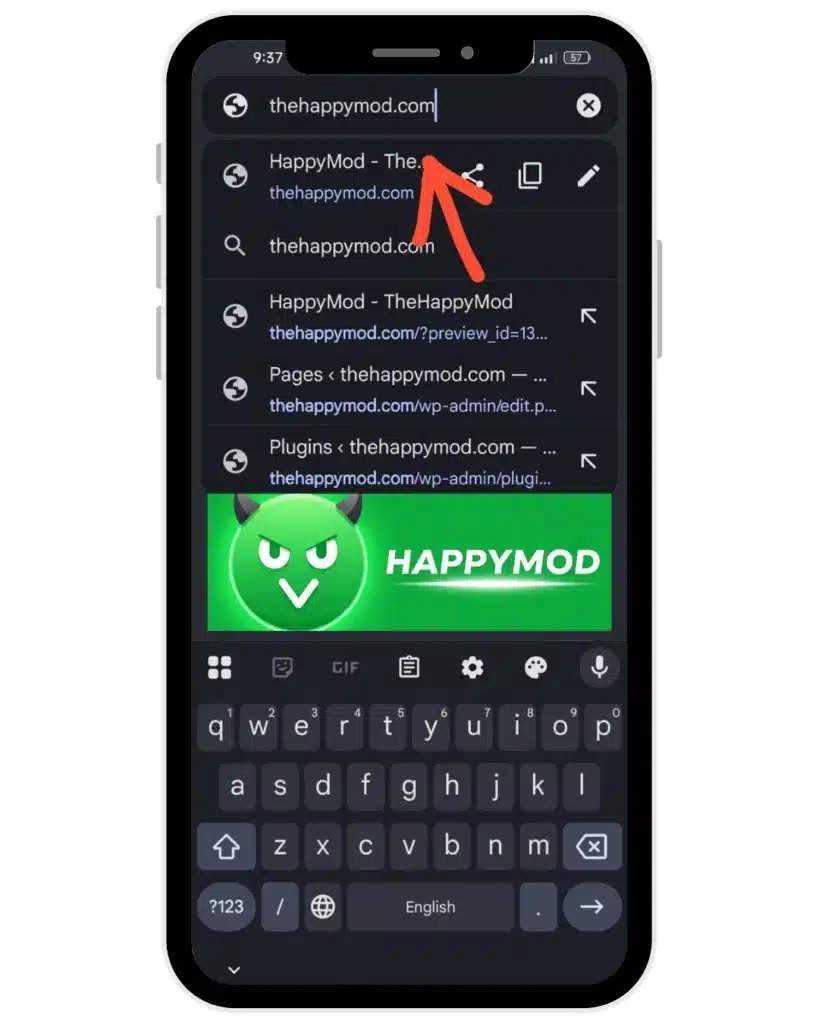
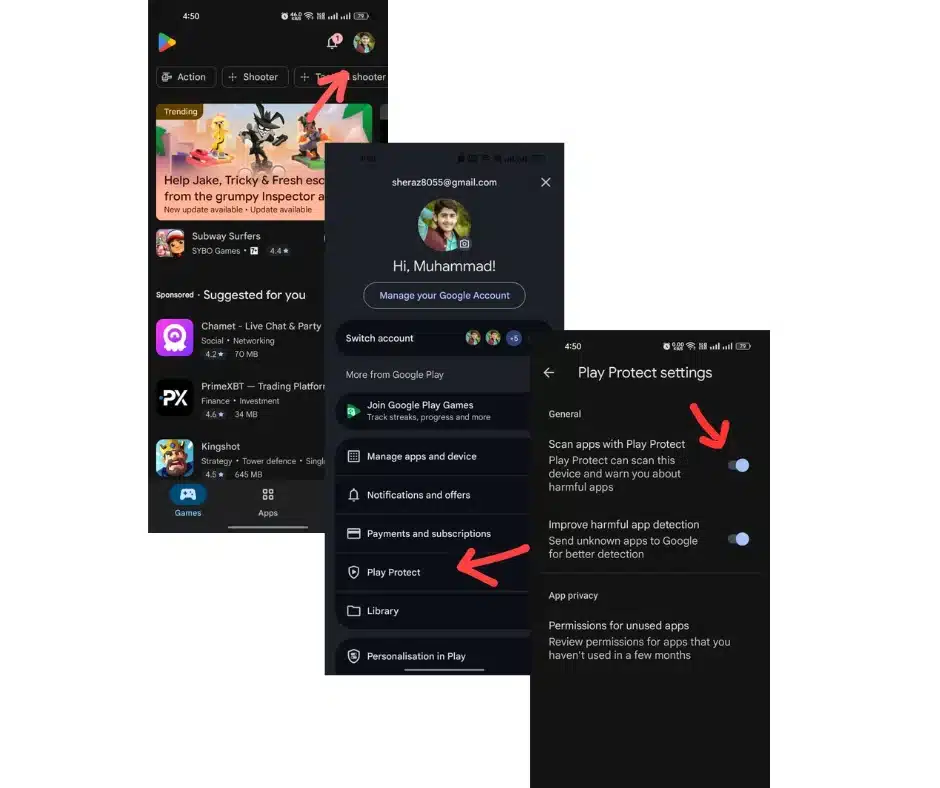
Enabling Unknown Sources — permission to install an app from outside the Play Store — differs by Android version, and using the wrong path causes the most common install failure reported. Match your version:
Android 8.0 and newer (per-app permission)
1Open Settings → Apps → Special access → Install unknown apps → select your browser → Allow. Android 8+ grants this per source app, so enabling it for one browser does not enable it for another — a step readers on newer phones miss most often.
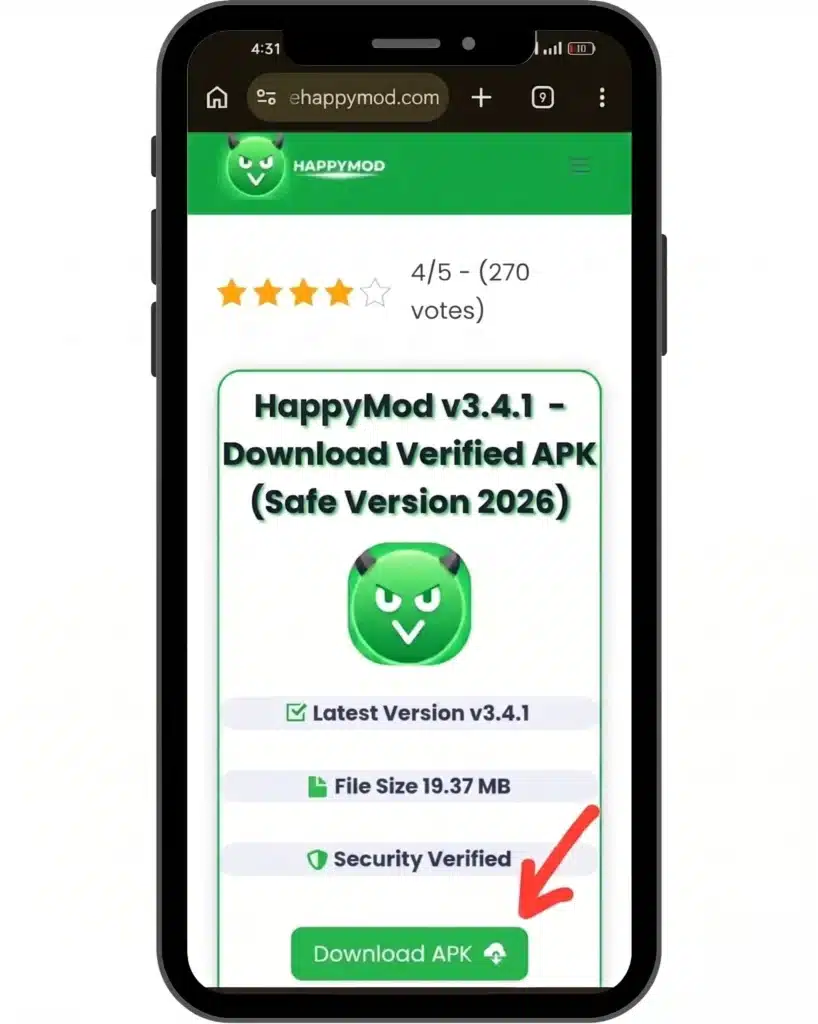
2Download the APK with the button above.
3Open the file from the notification shade or Downloads.
4Confirm the install prompt. Android flags the unrecognized source; that is expected for any sideloaded app and is not a malware finding.
Android 5.0–7.1 (single global toggle)
1Open Settings → Security → Unknown Sources → Allow. This is one device-wide switch, with no browser-selection step.
2Download and open the APK, then confirm the prompt.
Android 13 and 14
the per-app model applies, plus a runtime notification-permission prompt on first launch (a 2023+ platform change, not specific to this app) and stricter scoped storage. A mod requesting broad storage access may need it granted manually in Settings → Apps → HappyMod → Permissions if it is not offered at install.
Large game mods carry a second file
A big title is split into the APK plus an OBB — an expansion file holding the game’s assets. Installing the APK alone leaves such a game crashing on launch or stuck at a loading screen, because the assets are missing. Installing through the HappyMod app places the OBB automatically; installing a bare APK downloaded elsewhere does not, which is the single most common cause of a “the mod won’t open” report on large games. When a listing shows both an APK and an OBB/data file, both are required.
Confirm the install worked
by opening the app once: it should launch to its own interface and, on first run, request only the permissions its stated function needs. A freshly installed mod demanding permissions unrelated to what it does — an offline game asking for SMS or contacts — is the moment to uninstall and re-check the scan, not a week later. Then scan any mod downloaded through the app before opening it. Browsing, searching, reading mod details, and requesting a mod that isn’t listed are all covered once installed, in the full guide to using the app.
HappyMod Won’t Open or the Download Is Stuck?
Most failures trace to one of three sides, and telling them apart is the whole fix — the wrong diagnosis wastes time on the wrong side:
Your device
an outdated app, a full storage volume, or a cache glitch. Clearing the app cache and updating to the current build resolves most of these. A download that stalls immediately at 0% is storage or cache, not the network.
HappyMod’s servers
a “try again later” or “servers busy” message during peak load. This is the single most common complaint reported, and when it is genuinely server-side it clears on its own; the down-status page covers how to tell a real outage from the other two causes.
Your network or ISP
some ISPs block HappyMod at the DNS level, so the app cannot reach the server at all and shows the same “try again later,” or they throttle the download so the APK stalls part-way through instead of finishing. Switching network, or changing your DNS, clears both. The device-side fixes have the step-by-step.
The tell between a server problem and an ISP block is that a server outage clears with time while a DNS block persists until you change network or DNS — same error message, opposite fix.
Available On: PC, iOS, Pro, Older Versions
No native Windows or Mac build exists. Access runs through an Android emulator — BlueStacks or similar — executing the same APK, not a separate desktop edition.
No real iOS version of HappyMod exists, and none ever has. The app is compiled Android code; an iPhone cannot execute an .apk file. A promised iOS build “coming soon,” a Cydia install, a configuration-profile install, or a “web app” version is a workaround built for an unrelated tool and repurposed to look like an iOS install — a red flag, not a shortcut.
“HappyMod Pro” is not a real paid tier — no such release exists. A rebranded repackaging sold under that name is covered in full on the Pro-version page.
for a device needing an older Android target or a rollback from a broken update — each with its real size and changelog.
Explore Mods by Game
The catalog spans thousands of titles. The games directory breaks the mod options down by title with a per-game safety note — Minecraft, Roblox, GTA San Andreas, Clash of Clans, Toca Boca, Among Us, and Subway Surfers are among the most requested.
HappyMod Alternatives
Uptodown, Softonic, Aptoide, and ACMarket occupy the same space with real differences underneath the surface similarity — review process, catalog size, modded-content policy. See the attribute-by-attribute comparison before treating any two as interchangeable.
Download HappyMod — then verify before you install
Grab the current APK and run it through the multi-engine scanner in under 30 seconds — a real detection count, not a badge.