
Is HappyMod Safe? A Verified, Mechanism-Based Answer
HappyMod’s platform file itself scans clean across major antivirus engines and its signing hash is published for anyone to verify — that part is checkable, not a claim taken on faith. The real variability is in the 200,000+ community-uploaded mods it distributes, where individual files range from genuinely safe to actively malicious. Below: how to tell the difference and what the actual risks are, mechanism by mechanism.
Is the HappyMod Platform File Safe?
The current HappyMod APK returns 0 detections across 65+ VirusTotal engines, with a published SHA256 hash anyone can match against their own download before installing — check it with the site’s virus scanner rather than trusting a restated number.
The platform file has also been installed and run on real Android 13 and 14 hardware, confirming it requests only the permissions its actual functions need — storage access to save downloaded mods, network access to browse and fetch them — with no unexpected prompt for contacts, SMS, or call-log access appearing during normal use.
That’s what “the platform is safe” actually means here: a specific, checkable file, verified a specific way — not a blanket guarantee extending to everything distributed through it.
It’s also worth noting that Android’s own Play Protect system scans sideloaded installs, not just Play Store downloads, and Google has been moving toward requiring developer verification for sideloaded apps as an additional layer starting in 2026 — meaning the platform file sits inside an environment with real, independent scrutiny beyond whatever this page or any third-party scan reports, not outside it entirely.
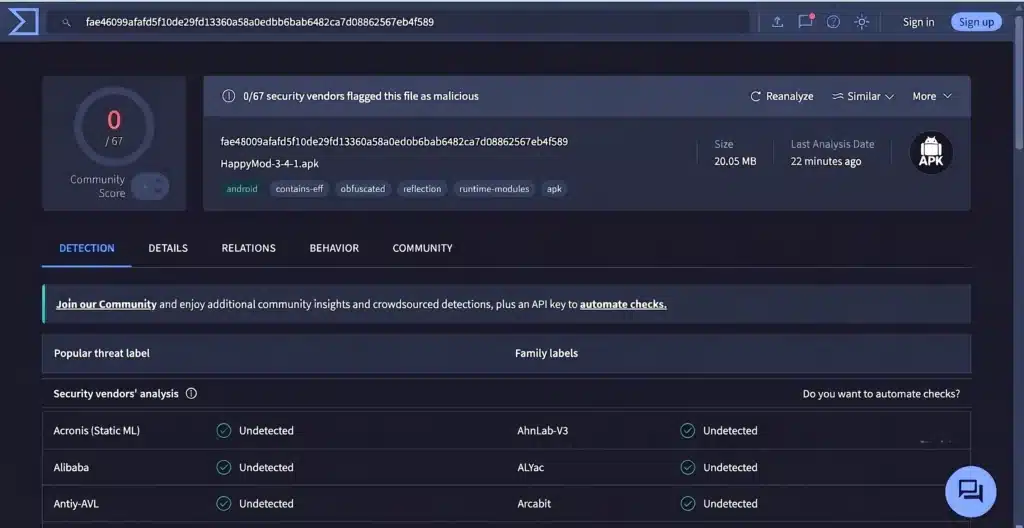

The Real Risk Is in Individual Mods, Not the Platform
The distinction that matters: the HappyMod app is one file that can be scanned and verified directly. The mods it distributes are over 200,000 individual community uploads, and no platform-wide promise re-audits all of them continuously — that scale makes it structurally impractical, not a broken promise. This is why “is HappyMod safe” and “is this specific mod safe” are different questions with different answers: the app passes a direct check, while whether a given mod is safe has to be judged mod by mod.
Dynamic Code Loading: How a “Clean” Scan Still Turns Malicious
The mechanism behind most real HappyMod-adjacent risk is Dynamic Code Loading (DCL) — code deliberately left dormant at install time that only activates once the app is already running, specifically to slip past a one-time install scan. A mod using DCL can request ordinary-looking permissions at install (storage, network access) and only reveal what they’re actually used for after the dormant code activates, including reading stored login tokens for Google or Facebook accounts already signed in on the device.
Mechanically, the dormant payload isn’t present in the file a scanner examines at install — it gets fetched from a remote server the first time the app actually runs, which is exactly what lets a file scan clean and still turn malicious minutes or hours later. This is also why a one-time scan result, however clean, only answers “was this file malicious at the moment it was scanned” — not “will it stay that way after its first launch.”
Modified APKs are the natural carrier for this technique for a structural reason: modifying an app’s code breaks the original developer’s signature, so every mod has to be re-signed with a new certificate and sideloaded outside Google Play regardless of what else changed. A stock Play Store app can’t easily carry a DCL payload because it has to pass Play Store review first; a modded APK, having already been re-signed and pushed outside that review process for an unrelated reason (the mod itself), faces no equivalent gate stopping a remote-loading stub from riding along.
Once active, the two most common payload behaviors are abusing Android’s accessibility service — which can read on-screen content and auto-approve permission prompts the user never consciously agreed to — or drawing a fake screen on top of a legitimate one. The next two sections cover what each of those specifically leads to.
Phishing Lookalikes: Fake Login Screens Inside Mods
The overlay-abuse case described above has a specific, common form: a mod renders a fake login screen directly over a real one — most often a Google or Facebook sign-in prompt the device already trusts — timed to appear exactly when the real login screen would.
Typing a password into that overlay sends it to whoever controls the mod, not to Google or Facebook; the real login screen is still there underneath, which is why the trick works and goes unnoticed until an account shows unfamiliar activity later.
This is meaningfully different from a phishing website reached by clicking a suspicious link — there’s no URL to check, no browser address bar to inspect, because the fake screen is rendered from inside an app already installed and running on the device.
The practical defense is behavioral, not visual: a login prompt appearing somewhere it normally wouldn’t (mid-game, after opening an unrelated mod) is the actual tell, since a well-made overlay can otherwise look identical to the genuine screen.
The related-but-separate risk — copycat websites that impersonate the real HappyMod download page to serve a tampered file in the first place — is covered in the guide to spotting fake HappyMod sites.
How to Vet a Mod Before Installing (Step-by-Step)
Six checks, in order of how much they actually tell you:
1Scan the downloaded file through the multi-engine virus scanner and read the actual detection count, not just whether the result shows “clean” or not — a single flag out of 65+ engines means something different from a dozen engines agreeing on the same threat family.
2Check how many engines agree, and on what. One engine flagging a re-signed file can be a heuristic reaction to the re-signing itself, not a real threat finding. Several engines naming the same specific threat family (a trojan, a known adware SDK, a credential-stealer) is the case worth acting on.
3Match the requested permissions to the mod’s actual function (detailed in the next section) — this is the check that catches what a scan of the file at rest can’t, since a DCL payload’s real behavior doesn’t show up until after install.
4Read the most recent comments on the mod’s listing, not just its star rating. A rating reflects the mod’s history; recent comments reflect whether the specific upload currently available still works and hasn’t changed.
5Confirm the file extension is .apk. Anything ending in .exe, .dmg, or wrapped in an installer format claiming to be an Android mod is not an Android file, regardless of what it’s labeled.
6If the mod is for an online or competitive game, weigh the ban risk separately from the malware risk (covered below) — a mod can pass every safety check above and still carry account-ban risk that has nothing to do with malicious code.
What Permissions Should (and Shouldn’t) a Mod Request
A permission request that doesn’t match what a mod’s function requires is one of the more reliable, checkable warning signs available before installing anything:
A coin/currency-unlock mod
needs storage and network access to fetch its unlock data — a request for SMS or call-log access is a mismatch worth stopping on.
A cosmetic/skin-pack mod
(visual changes only, no online features) needs almost nothing beyond storage — a request for contacts access has no function to justify it.
An offline single-player mod
needs no network access at all — a request for both network and precise location together, with no online feature to explain it, is a combination worth treating as a red flag rather than routine.
The general check: name what the mod actually does, then ask whether each requested permission is required for that specific function. A permission with no connection to the mod’s stated purpose is the signal, not the presence of any single permission in isolation. More on Android permission categories in general.
Why Some Users Report Battery Drain
A specific, repeated complaint is battery draining unusually fast — roughly 1% per minute — after installing several mods.
This has a concrete, explainable cause rather than being a vague side effect: a mod carrying an injected background process, whether an ad-fetching library or a DCL payload maintaining a live connection to its remote server, runs continuously in the background and consumes CPU and battery well beyond what the legitimate app’s normal operation would.
A mod that drains battery unusually fast after install is worth uninstalling and checking for this specific cause, not dismissing as an unrelated device issue.
Can Using HappyMod Get You Banned?
Yes, on titles with online multiplayer or server-side verification. Anti-cheat systems in online games detect modified client files broadly — not by targeting HappyMod specifically, but by detecting that the installed game file doesn’t match the expected original.
The consequence on affected titles is a real, irreversible account ban: progress and purchases tied to that account are lost, with no appeal path in most cases.
This risk applies specifically to titles with server-authoritative systems — competitive shooters, battle-royale titles, and anything verifying player state against a central server — since the mismatch between the modified client and the server’s expected state is exactly what these systems are built to catch.
A single-player game, or an online game whose only server component is a leaderboard rather than gameplay verification, carries little to no equivalent detection, since there’s no authoritative server state for a local modification to contradict.
Is HappyMod Legal to Use?
Distributing modified copies of copyrighted apps without the original developer’s authorization is a copyright and terms-of-service violation on the distribution side — that’s not in question. For an individual downloading and using HappyMod, prosecution of end users for personal use is not the enforcement pattern seen in this space, but that’s a practical observation about enforcement, not a claim that the underlying activity is licensed or authorized.
The apps distributed through HappyMod are unauthorized modifications of someone else’s software, not a legally distinct alternative product. Separately, using a modified client in an online game’s terms of service is a private contractual matter between the player and the game’s publisher, enforced through account bans rather than legal action — the ban-risk section above and the copyright question here are related but distinct: one is a platform’s own enforcement of its rules, the other is a broader legal framework around modifying and redistributing software at all.
Rooted Devices: Higher Risk
Running HappyMod or its mods on a rooted device removes a layer of Android’s built-in sandboxing, which raises the ceiling on what a malicious DCL payload could access if one activated.
The full breakdown of rooted-device-specific risk covers this in detail — the short version here is that rooting doesn’t make HappyMod itself more dangerous, but it removes a safety net that would otherwise limit the damage if a specific mod turned out to be malicious.