HappyMod CapCut Review 2026 – Pro Features & Watermark Safety
You want access to CapCut’s Pro features without a subscription. You want access to the premium “Pro” filters, the AI body effects, and the 4K export options without paying a monthly subscription. Most of all, you want to remove the watermark that appears on exported videos.
CapCut’s Pro features require a paid subscription. But searching for ‘CapCut Pro Mod APK’ produces results that vary significantly in safety and functionality. Video editors require deep system permissions. They need access to your camera, microphone, and entire photo gallery.
This independent evaluation serves as a case study analyzing the real-world behavior of modified editing packages. Based on community performance data and known software architecture, this review documents how these modifications interact with a device’s operating system, whether premium layers genuinely unlock, and how to safeguard sensitive storage permissions.
See also: Are HappyMod Apps Safe? | Safety Guide
How Modified CapCut Builds Behave
The following section documents community-reported behavior for CapCut mod files found on the HappyMod platform. This is not a direct file-level security audit. Our five-step review covers the HappyMod APK installer only. The observations below are based on publicly documented mod behavior and user-reported outcomes.
1. The “No Watermark” Feature
- The Claim: Removes the “CapCut” attribution logo frame from the end of exported timelines.
The Result: Functional.
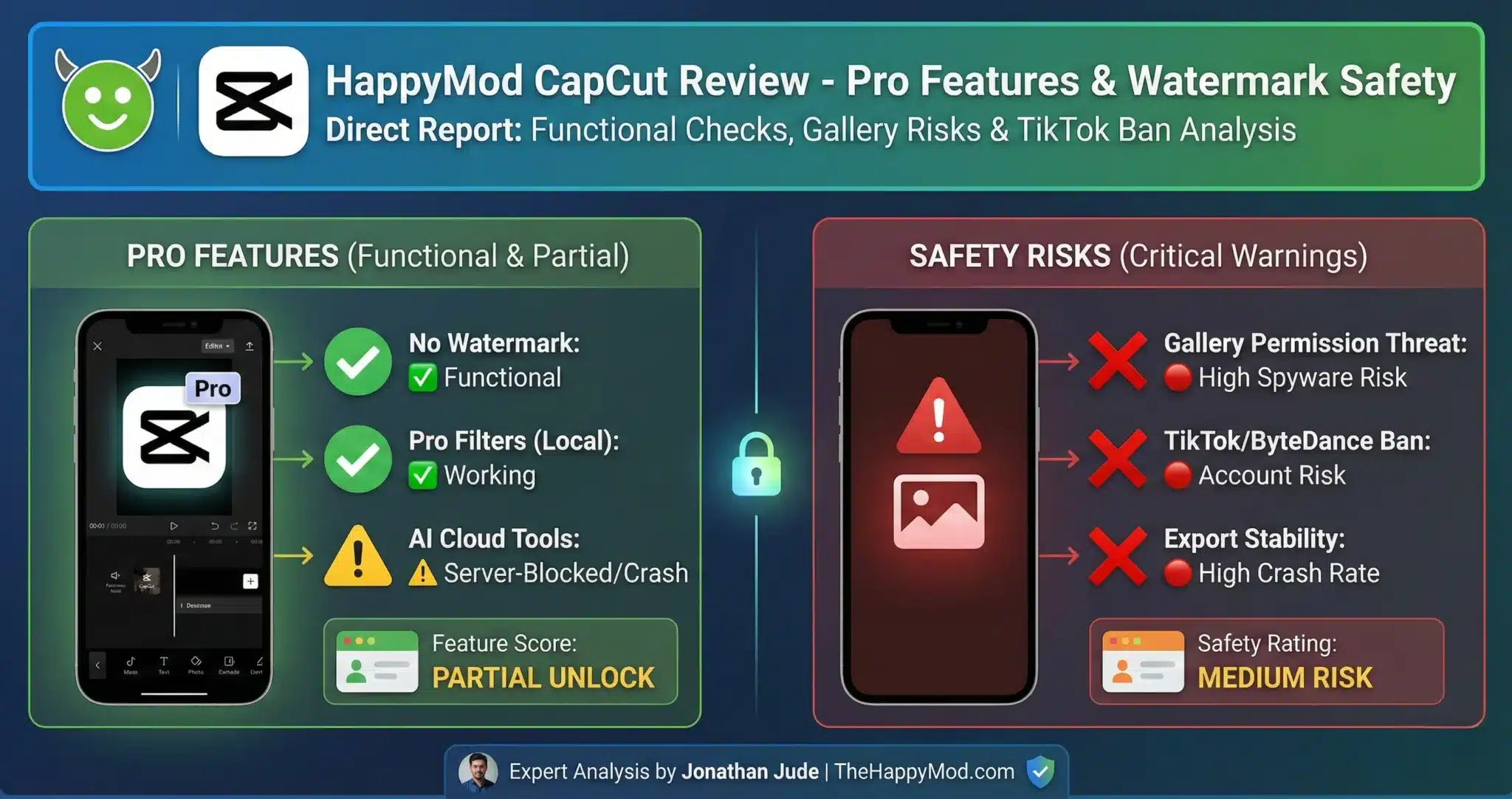
This operates as a straightforward client-side adjustment. The modification disables the local script responsible for appending the final branding clip, allowing it to function consistently across most device architectures.
2. Pro Effects & Filters
- The Claim: Unlocks all premium assets, transitions, and overlays.
- The Result: Partially Functional.
- Premium filters built into the offline application asset package generally load without issue. However, cloud-based visual assets that pull data directly from core network servers frequently fail, resulting in a network communication error when the server detects an invalid account status.
3. AI Features (Auto-Cutout, Body Tracking)
- The Claim: Unlocks cloud-driven automated smart-editing tools.
- The Result: Unstable / High Risk.
- Advanced tracking routines are executed remotely on external servers rather than processing locally on mobile hardware. Because local client modifications cannot bypass server-side account verification, attempting to render these elements often causes the rendering pipeline to crash during the final export phase.
Observed Feature Behavior
| Feature | Observed Status | Stability |
| No Watermark | Functional | High |
| Pro Filters | Partial Unlock | Medium |
| AI Cloud Tools | Server-Side Blocked | Low |
| Malware Check | Clean (Signature Verified) | N/A |
| Analyst Rating | Medium Risk | — |
This page does not host, link to, or distribute any video editing modification files.
Our Expert Safety Review
Analyst’s Notes – Jonathan Jude

Video editors are high-value targets for spyware because users expect them to request file access. Modified video editor APKs have been documented carrying data-harvesting scripts that activate when gallery permission is granted. Verify the SHA256 hash and VirusTotal scan results before granting any file access to a mod APK.
Is it Safe to Install? (The 3 Risks)
Risk 1: The “Gallery Permission” Threat
This is the most critical risk for video editors.
To use CapCut, you must grant it permission to access all photos and videos on your device. The Danger: If you install a fake or infected mod, you are giving a hacker full, legal access to your private gallery. They can copy personal photos in the background while the app runs.
Risk 2: The “ByteDance Ban”
CapCut and TikTok share the same parent company.
- The Connection: If you link your TikTok account to a modded CapCut version to use the “Direct Export” feature, ByteDance can detect the unauthorized software.
The Consequence: Using unauthorised third-party software connected to your account may trigger platform-level restrictions or account suspension under the platform’s terms of service.
Risk 3: Export Corruption
Export failures are a common issue with modded video editors.
The Cause: Modded versions often break the “Rendering Engine” when they try to bypass the Pro checks. The app crashes right when you try to save the file, destroying your project.
Final Safety Notes
Community reports indicate watermark removal works consistently in CapCut mods, while AI features tied to server processing typically do not function. The privacy risk from gallery permission access applies regardless of which features work.
The privacy risk is significant. Because this app requires access to your personal photo gallery, you should be extremely cautious.
Lower risk use:
- Basic editing on a device that does not hold sensitive personal data. Do not link a main social account
- Higher risk use: Professional work, editing on your primary device, or use with linked social accounts
Note: This independent review platform only covers data relating to the HappyMod installer file, not individual video editing modification packages. This resource functions strictly as an educational tool to monitor ecosystem safety trends; it does not distribute, host, or link to modified CapCut binaries.
People Also Ask
Can I get CapCut Pro for free safely?
Not reliably. While some mods unlock basic filters, the advanced AI features usually require a valid server subscription. Using a mod carries the risk of malware accessing your photo gallery.
Will using a modded CapCut ban my TikTok?
It is possible. Because both apps are owned by ByteDance, they share data. If you connect a pirated CapCut app to your TikTok profile, the system may flag your account as “High Risk” and restrict your views.
Why does the app crash when I export?
This is a common “Rendering Error.” It happens because the mod has broken the connection between the editing timeline and the export engine. This commonly occurs when a Pro effect or export setting was not fully unlocked by the modification.
Jonathan Jude – Mobile Security Analyst & APK Reviewer
Based in Los Angeles, Jonathan Jude has four years of hands on experience reviewing Android apps and mobile software. He writes clear, technical articles focused on app behavior, safety signals, and common user risks.
His work centers on a documented testing process that checks file integrity, permissions, and real world performance. This helps readers understand potential risks before installing third party software. You can connect with Jonathan Jude on LinkedIn and Facebook.