Android App Permissions Explained for HappyMod [2026]
You install a “Flashlight” app. It asks for access to your Contacts. You install a “Calculator.” It asks for your location.
Stop.
These are Security Violations. Permissions are the keys to your digital house. If you give an app the key to your front door, it can come in anytime. If you give it the key to your safe (your banking app), it can take your money.
I operate TheHappyMod.com to help you use modified apps safely. Because HappyMod is a third party tool, you must be smarter than the average Play Store user. You need to know which requests are normal and which ones are traps.
This guide explains the specific permissions the HappyMod Installer requires, the dangerous “Red Flags” you must always deny, and how to audit your phone settings to keep your data private.
The Basics: Functional vs Malicious
Before we list specific permissions, you must understand the two categories used in security audits.
1. Functional Permissions (Green Light)
These are necessary for the app to do its job.
2. Over Privileged Requests (Red Light)
These are requests that make no sense for the app’s function. They are usually designed for Data Harvesting.
Audit: What Permissions Does HappyMod Need?
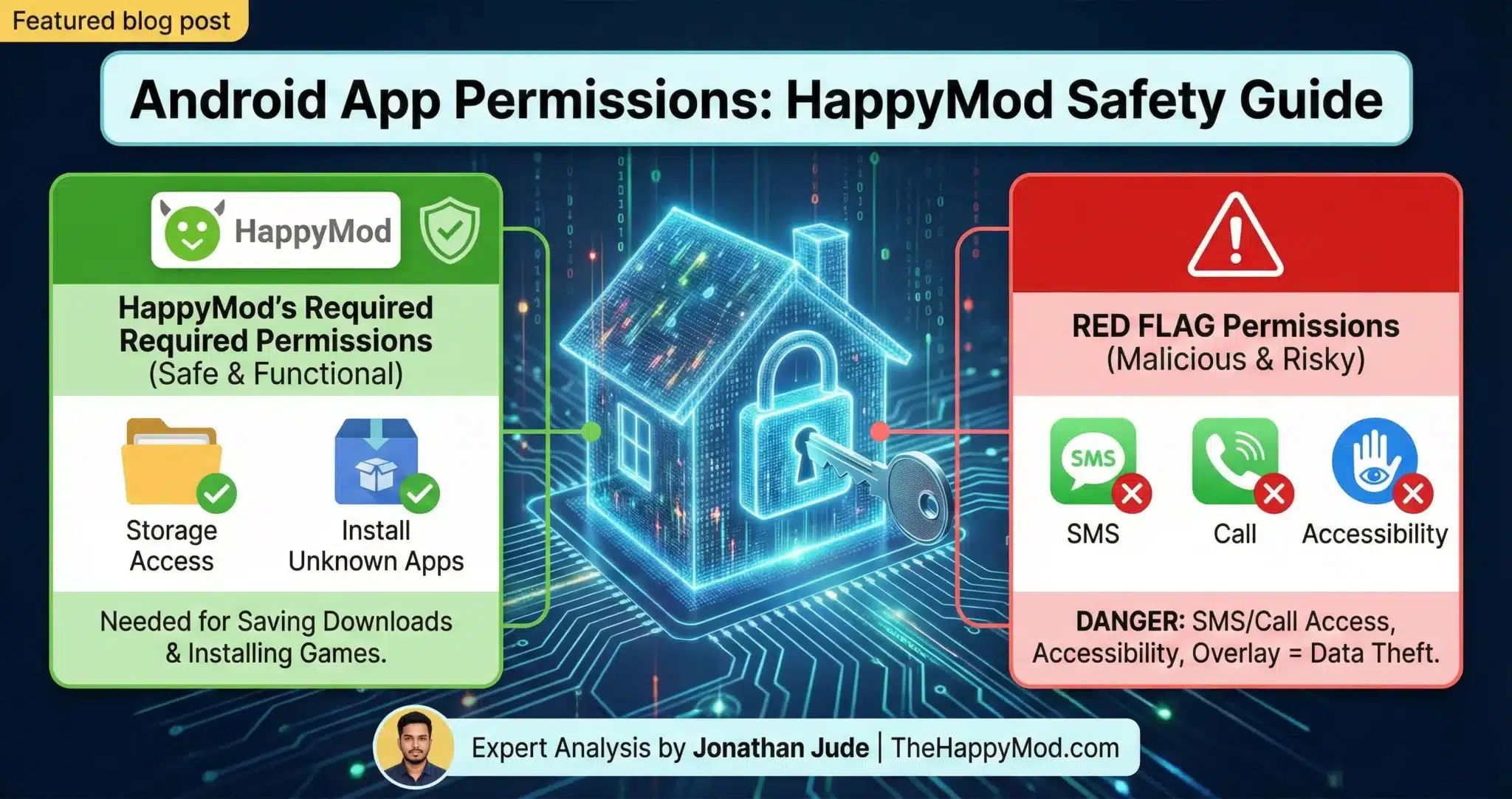
When you install the HappyMod Installer (verified by our team), it typically requests two permissions. These are required for it to function as an App Store.
Request 1: Storage Access (Files and Media)
Why it needs this: HappyMod is a downloader. When you tap “Download” on a game like Minecraft, the app needs permission to write that file to your phone’s internal memory. If you deny this, the download will stay at 0% forever because the app has nowhere to put the data.
Safety Check: On modern Android versions (11+), this is often called “Scoped Storage.” The app can only see the files it creates. It cannot look at your private photos unless you specifically allow “All Files Access.” HappyMod does not need “All Files Access,” just standard media access.
Request 2: Install Unknown Apps
Why it needs this: After the download finishes, HappyMod needs to trigger the Android Package Installer to set up the game. Because the game did not come from the Google Play Store, Android considers it “Unknown.” You must give HappyMod permission to start this installation (If you see an error here, check our [App Not Installed Fix]).
This permission allows HappyMod to say: “Hey Android, please install this file I just downloaded.” It does not give HappyMod root access (see our Rooted Device Guide). It does not allow it to change your system settings. It is a standard function for any third-party app store.
The “Danger Zone”: High Risk Permissions to Watch For
If you download a “Mod” from a random site, or if you accidentally download a fake version of HappyMod (learn to spot them here), you might see requests that do not belong.
Here is my “Blacklist.” If an app asks for these, Uninstall it immediately.
1. Read/Send SMS
- The Request: “Allow app to view and send SMS messages?”
- The Risk: This is the most dangerous permission. Malware uses this to steal 2FA (Two-Factor Authentication) codes. If a hacker has your password and your SMS code, they can empty your bank account.
- Verdict: Never grant this to a game or utility.
2. Make and Manage Phone Calls
- The Request: “Allow app to make and manage phone calls?”
- The Risk: Some malware (Toll Fraud) will dial premium-rate numbers in the background while you sleep. You will wake up to a massive phone bill.
- Verdict: Only your Dialer and WhatsApp need this. Deny it for everything else.
3. Accessibility Services
- The Request: “Turn on Accessibility Service for [App Name]?”
- The Risk: This is a powerful tool designed for blind or disabled users. It can read text on the screen and tap buttons for you. Hackers use it to create Keyloggers. They record everything you type, including passwords.
- Verdict: This is a major red flag. Legitimate games do not need Accessibility Services.
4. Device Administrator
- The Request: “Activate Device Admin app?”
- The Risk: This gives the app control over your lock screen and security settings. Malware uses this to prevent you from uninstalling it. If you try to delete the app, it will deny the request because it is an “Admin.”
- Verdict: Never grant this.
5. Overlay (Draw Over Other Apps)
- The Request: “Allow display over other apps?”
- The Risk: This allows the app to put a picture on top of another app. Hackers use this for Cloaking. You think you are typing your password into Facebook, but you are actually typing it into an invisible layer owned by the malware.
- Verdict: Only grant this if you trust the app 100% (like Facebook Messenger bubbles). Be very careful with mods that ask for this.
How to Audit Your Phone
You should check your permissions regularly. You might have been granted something by accident months ago. Follow these steps to clean your device.
Step 1: Open Permission Manager
- Go to Settings.
- Tap Privacy or Security.
- Tap Permission Manager.
Step 2: Check the “Big Three”
Look at these three categories first. They contain the most sensitive data.
- Location: Which apps can see where you are? Does a flashlight app need this? (No).
- Camera: Which apps can watch you?
- Microphone: Which apps can listen to you?
Step 3: Revoke Access
If you see an app that looks wrong (like Subway Surfers having access to your Microphone):
- Tap the app name.
- Select “Don’t Allow” or “Ask Every Time.”
- The app might complain, but it is better to be safe.
Conclusion
Permissions are not just pop-ups to click away. They are decisions. Every time you tap “Allow,” you hand over a piece of your privacy.
The Golden Rules:
- Read before you tap. Do not just click “Next, Next, Next.”
- Context is King. Does a calculator need a camera? No. Does Instagram need a camera? Yes.
- Trust the Source. Only install apps from verified sources like our Safety & Security Guide. We scan the permissions for you.
If you are ever unsure, tap Deny. If the app crashes, you can always turn it back on later. If the app works fine without it, you just saved your data from a tracker.
Stay Safe. Review the full Safety Protocol on our main Safety & Security Guide to understand how we test these files before you download them.
People Also Ask
What are Android app permissions in simple terms?
Think of your phone as your house and each app as a guest. Permissions are the keys you give to that guest. A map app needs the key to your location to work, which makes sense. But if a simple flashlight app asks for the key to your contacts list, you should be suspicious. Permissions let apps function, but you get to decide which keys you hand out.
Why do apps even need to ask for permissions?
Apps need permissions to interact with your phone’s features and data to do their job. For example:
A camera app cannot take pictures without Camera permission.
A messaging app cannot find your friends without Contacts permission.
A game cannot save your progress without Storage permission. The system is designed so that apps must ask for your consent before accessing sensitive information.
What is the “Storage” or “Files and Media” permission?
This permission allows an app to read, write, and delete files on your phone. This is one of the most common permissions. A photo editing app needs it to save your edited images, but a simple calculator app probably doesn’t. You should always question why an app needs to see all your personal files.
Is it safe to give an app “Location” permission?
It is safe only if the app has a legitimate reason to know where you are, like a weather or navigation app. For the best privacy, you should always choose the option to “Allow only while using the app.” This stops the app from tracking your location in the background when you are not using it.
What is the most dangerous permission on Android?
The single most powerful and dangerous permission is called “Accessibility Services.” While it is designed to help users with disabilities, it has become a major target for malware. An app with this permission can read everything on your screen (including passwords) and control your phone for you. You should be extremely cautious and almost never grant this permission to a downloaded app.
Is it okay to deny permissions to an app?
Yes, absolutely. If you do not think an app needs a certain permission, you should deny it. In some cases, a specific feature of the app might not work, but the rest of the app will often function just fine. Your privacy is more important than a minor app feature.

Jonathan Jude – Mobile Security Analyst & APK Reviewer
Based in Los Angeles, Jonathan Jude has four years of hands on experience reviewing Android apps and mobile software. He writes clear, technical articles focused on app behavior, safety signals, and common user risks.
His work centers on a documented testing process that checks file integrity, permissions, and real world performance. This helps readers understand potential risks before installing third party software. You can connect with Jonathan Jude on LinkedIn and Facebook.
![How to Update HappyMod Manually Without Errors [2026]](https://thehappymod.com/wp-content/uploads/2025/08/How-to-Update-HappyMod-Manually-Without-Errors-768x406.webp)